DELL JWH30 Alienware Cooling Fan R3 DC28000ILS0
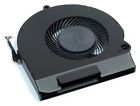
( Brand: Dell ), ( Manufacturer Part Number: JWH30 ), ( Type: Cooling Fan )
Review DELL Alienware R3 Cooling Fan
The DC28000ILS0 Dell Alienware 15 R3 Cooling Fan is a crucial component of the high-performance gaming laptop, the Alienware 15 R3. This fan is designed to ensure optimal thermal management, enabling the laptop to maintain its performance even under intense gaming sessions or heavy-duty applications.
The fan boasts a 12V DC voltage, which provides ample power to effectively dissipate heat generated by the laptop's internal components. Its diameter measures 80mm, ensuring a large surface area for improved airflow and enhanced cooling efficiency. The fan's blade design is optimized for quiet operation, minimizing noise disturbance while still delivering impressive cooling performance.
The DC28000ILS0 fan is built with durability in mind, featuring a robust construction that can withstand the rigors of frequent use. It is also designed to be easy to replace, should the need arise, making maintenance of your Alienware 15 R3 a straightforward process.
In summary, the DC28000ILS0 Dell Alienware 15 R3 Cooling Fan is an essential component that ensures your laptop runs smoothly, efficiently, and quietly, even under heavy loads. With its powerful performance, quiet operation, and robust construction, this fan is a reliable choice for any Alienware 15 R3 user seeking to maximize their laptop's performance and longevity.
Pros of buying Dell Alienware 15 R3 (DC28000ILS0) cooling fan:1. High-quality build: The fan is made by Dell, a reputable brand known for its durable and reliable products.
2. Compatibility: It is designed to fit specifically into the Alienware 15 R3, ensuring a seamless integration with the laptop.
3. Enhanced cooling: The fan is intended to improve the overall cooling performance of the laptop, reducing the risk of overheating and potentially extending the lifespan of the device.
4. Easy installation: The fan is relatively simple to install, saving time and effort compared to more complex repairs.
Cons of buying Dell Alienware 15 R3 (DC28000ILS0) cooling fan:1. Cost: Replacing a cooling fan can be an expensive investment, especially if the original fan is still functioning adequately.
2. Potential for voiding warranty: Installing a third-party part may void the laptop's warranty, although this can depend on the specific terms of the warranty.
3. Requires technical knowledge: While the installation process is relatively straightforward, some technical knowledge is required to properly replace the fan, and mistakes could potentially damage the laptop.
Conclusion:If you are experiencing overheating issues with your Alienware 15 R3 or simply want to proactively improve its cooling performance, the Dell Alienware 15 R3 (DC28000ILS0) cooling fan could be a worthwhile investment. However, it's essential to consider the potential costs and risks involved, such as the replacement cost, potential voiding of the warranty, and the need for technical knowledge. If you are unsure about the installation process or if the fan is truly necessary, it might be best to seek professional help or consult with Dell's customer support.
Recommendation:If you decide to proceed with the purchase, ensure you have the necessary tools and technical knowledge, or consider hiring a professional to install the fan for you. It's also wise to thoroughly research the installation process and review other users' experiences to avoid any potential issues. Additionally, make sure to save the original fan in case you ever need to return the laptop for warranty service.
Details:
All systems pass Dell diagnostics.
Lodestar tech512 Dell JWH30 alienware 15 r3 cooling fan DC28000ILS0 part number: condition: refurbished removed from fully tested system there are multiple numbers for replacement parts, even the same depending on original configuration and options correct number can be found embedded in serial bar code. Guaranteed to be fully functional. This fee is to cover return shipping costs, re-testing of item and supplies.
Please message if there are any questions, and include the service tag of your system. The part number is first 5 alpha-numeric characters immediately following CNN-0.
CNN-0xx-xx-x-x. Offers by lodestar tech512 here to view our ongoing on offer wizard the complete management software solution.
part #: jwh30 prices
- $9.99-$25.04
specifications casefahea:
- brand: Dell
- mpn: Jwh30
- type: Cooling Fan
General casefahea:
- computers tablet's networking > computer components parts > fans heatsinks cooling computers tablet's networking > case fans fans heatsinks cooling
- in stock: Yes
- condition: Used
Payments casefahea:
- PayPal
Returns casefahea:
- type: Money back or replacement buyers choice
- paid by: Seller
- time: 30 Days
- policy: returns accepted
- details: Restocking fee: 10%
Shipping casefahea:
- cost: $0.0
- handling: 1 days
- type: Calculated
Seller casefahea:
- zipcode: 78642
- city: Liberty Hill, Texas
Offer casefahea:
- best offer: false
- Sold: 0
- bids: 0
- quantity: 1
- Started: June 24, 2017, 5:20 am
Ratings:
- Nice condition, professionally packed. 06-23-17
- Good transaction. Thank you! 06-23-17
- It works on my Dell Latitude e6430! 06-23-17
- Fast shipping, and good parts. Thanks! 06-23-17
- Some Screws missing and others rusted. 06-24-17
Dell JWH30 Is Similar To:
- Cooling F1yn7 0f1yn7 R620 014vg6 1.82a R320 Fan Dc 12v Dell (14.1% similar) ...(July 4th, 2015)
- 01ygw Dell Alienware Aurora R4 Cpu Cooling Fan W Heatsink Pp749 (42.7% similar) Shipping shipping costs are listed for the 48 contiguous states...(June 29th, 2016)
- 02x333 Cn-02x333 Dell New Genuine Dimension Cpu Cooling Fan 786301689785 (26.5% similar) ...(April 3rd, 2018)
- 02x585 Dell Cpu Fan Cover Rev With Nmb (31.3% similar) Dell CPU fan cover 02X585 rev A01 with numb 3612KL-04W-B66...(November 6th, 2018)
- 047cc4 Cn-047cc4 Dell New Delta High Speed Dc Fan 717580619514 (25% similar) Images to new delta PFC0812DE 12V high speed dc fan 47CC4 047CC4 brand: Dell part number: mpn: 047CC4, CN-047CC4 model:: type: voltage...(December 18th, 2018)
- 05560w Alienware Dell Aurora Cpu Liquid Cooling Assembly With Ring Water (28.6% similar) Dell alienware aurora r4 CPU liquid cooling assembly with ring 5560W water block you are buying on: used...(June 28th, 2018)
- 05f5ghj Unbranded For Dell Vostro Cpu Laptop Fan (27% similar) Shipping location will depend on delivery address. Find out more about your rights as a buyer and exceptions. Special delivery etc. Incorrect orders substitutes: in the unlikely event of receiving an order or a substituted item, please accept our apologies. 5 million products in stock marked us one ...(May 8th, 2018)
- 05u059 Cn-05u059 Dell Genuine Dimension Cpu Cooling Fan (29.6% similar) Lightly used genuine Dell dimension CPU cooling fan with shroud 05U059 CN-05U059 removed from working 2300 computer works good no abnormal sound 30 day warranty...(June 21st, 2018)
- 0625-12hb Datech Dell Fan (31.4% similar) Dell detach 12V 25MM x 60MM...(April 20th, 2018)
- 0636v Dell Vostro Aio Genuine Cpu Cooling Fan Glp (37.3% similar) Make the best deals with us. Good luck buying. Dell vestry AI genuine CPU cooling fan 0636V glop item is in very good working and cosmetic condition. Stock picture. If for some reason you are not satisfied with received item, e-mail us through messages. Money back guaranteed...(November 20th, 2018)
- 07d86k Dell Optiplex Cpu Cooling Fan (35.5% similar) New pull from working system. New pull from working system. Unit in working condition. Pictures are of actual product. Product highlights brand - ABC model BAZB0925R2UTYPE fan power interface 4 pin fan speed 3500RPM bearing fluid pulled from Dell apoplexy unit in working condition...(November 26th, 2018)